
Define Webhooks: What They Are and How They Work
A webhook is an HTTP POST a system sends your server when an event fires. Learn what a webhook URL is, how signing works, and why retries cause duplicates.
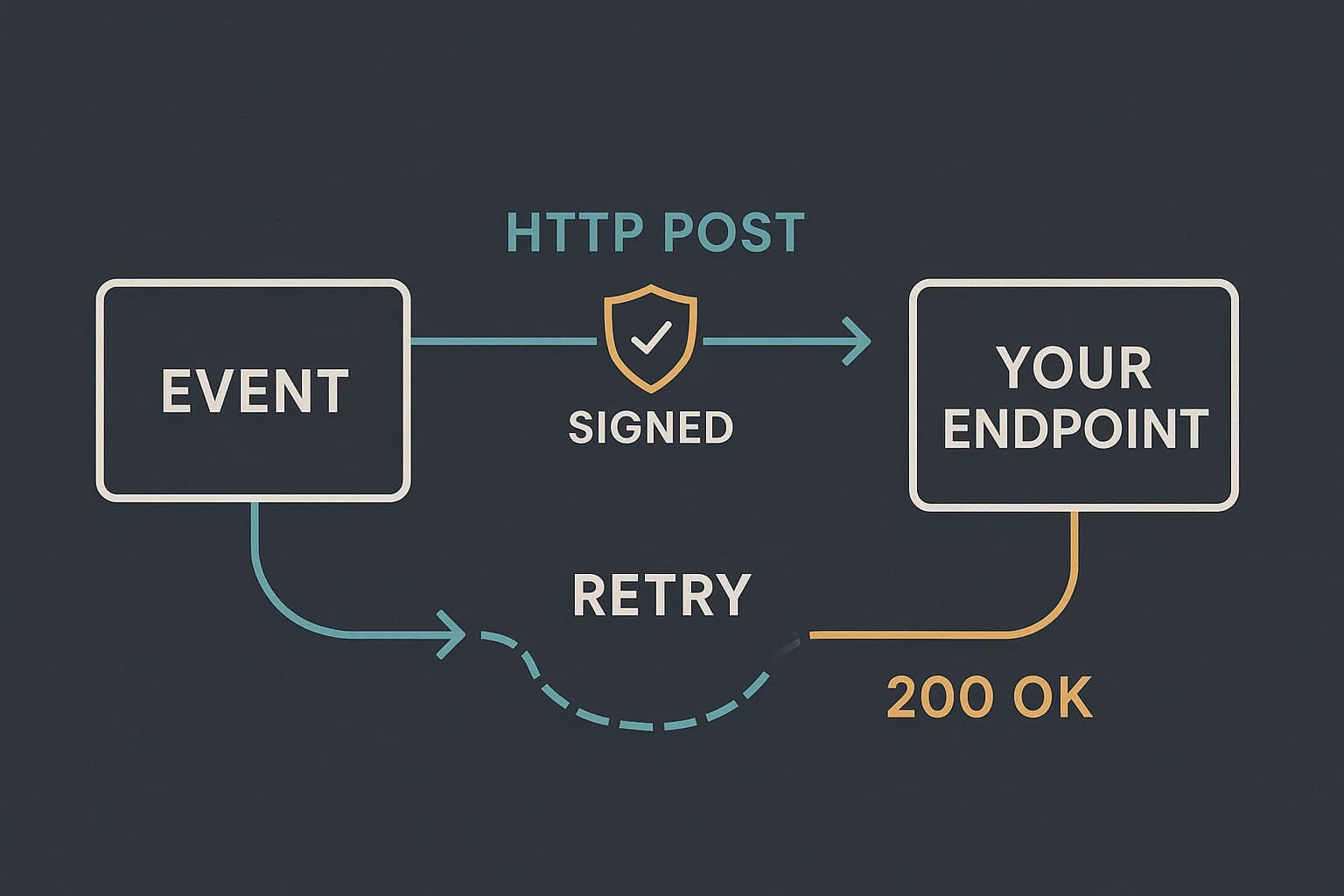
A webhook is an HTTP POST that one system sends to your server when something happens. You give the sender a URL. It calls that URL the moment an event fires. No polling, no waiting.
That is the whole definition. The rest is detail about payloads, signing, and retries. This guide walks each one, using real numbers from Stripe's docs and from how Draftbase ships its own webhooks.
What Is a Webhook?
Think of it as a reversed API call. With a normal API, your app asks and waits. With a webhook, the other system speaks first.
People also call it a web callback, a reverse API, or an HTTP push API. The names all point at the same shape. An event happens over there. A POST lands over here. The server that receives the data never asked for it — the sender decides when to push, not you.
The trade is simple. Polling wastes calls when nothing changed. Webhooks skip that, but you now run a public endpoint. That endpoint has to be reachable, fast, and hard to spoof.
What Is a Webhook URL?
A webhook URL is the public address you hand the sender. It is also called a webhook endpoint. The two terms mean the same thing.
It has to be an HTTPS URL in production. It has to accept POST. And it has to be reachable from the open internet. A localhost address will not work in live mode.
Stripe requires TLS 1.2 or higher, and treats a 3xx redirect as a delivery failure. (Stripe) That last one bites people. If your host redirects http to https, or bare domain to www, register the final URL. Do not register the one that redirects.
Most senders let you register several endpoints. Stripe caps it at 16 per account. Many teams use one endpoint per concern, not one giant handler.
How Does a Webhook Work, Step by Step?
Four things happen, in order.
First you register. You give the sender your URL, and you pick which events you care about. Second, an event fires in the sender's system. Third, the sender builds a JSON body and POSTs it to your URL. Fourth, your server replies with a 2xx status code to confirm receipt.
The events are named, and you subscribe to specific ones. Here is Draftbase's set:
| Event | Fires when |
|---|---|
entry.created | A new entry is saved |
entry.updated | An existing entry's fields change |
entry.published | An entry goes live |
entry.unpublished | A live entry drops back to draft |
entry.archived | An entry is archived |
entry.deleted | An entry is removed |
Subscribe to what you need, not to everything. Stripe says listening to extra events puts undue strain on your server. (Stripe)
The body arrives as JSON. The useful metadata rides in headers. Draftbase sends four:
X-Draftbase-Event: entry.published
X-Draftbase-Event-Id: 8f3c...
X-Draftbase-Timestamp: 1786113670
X-Draftbase-Signature-256: sha256=a1b2c3...
Reply fast. Return the 2xx before you do the real work. Draftbase gives a handler 10 seconds before it aborts the request and marks the attempt failed.
Should You Use a Webhook or Just Poll?
Polling still wins in a few cases. Pick by how often the thing changes, and by who runs the receiver.
Poll when changes are rare and you cannot host a public URL. A nightly job that pulls once and exits is simpler than a signed endpoint. There is no secret to store and no retry logic to write.
Use a webhook when the delay matters. A publish that should hit the site in seconds cannot wait for the next poll. Cutting the poll interval to close that gap just burns rate limit on empty checks.
There is a hybrid worth knowing. Take the webhook as a nudge, not as truth. When one lands, call the API to read the current state, then act on that. You get near-instant updates and you stop caring about order or duplicates. It costs one extra request per event.
The rest of this guide assumes you picked the webhook.
How Do You Verify a Webhook Is Real?
Your endpoint is public, so anyone can POST to it. With no check, a stranger can fake an event. It then triggers whatever a real one would.
The standard fix is an HMAC signature. The sender and you share a secret. The sender hashes the request body with that secret and puts the result in a header. You recompute the same hash and compare.
Draftbase signs with HMAC-SHA256 over the timestamp and body joined by a dot:
const expected = crypto
  .createHmac('sha256', secret)
  .update(`${req.headers['x-draftbase-timestamp']}.${rawBody}`)
  .digest('hex');
Two rules matter here, and both are easy to get wrong.
Use the raw body, not re-serialized JSON. Express and Next.js parse the body by default. Re-stringifying it changes whitespace and key order, and the hash no longer matches. Stripe's docs call this out directly. (Stripe)
Compare in constant time. A normal === returns early on the first mismatched byte. That leaks timing a snooper can measure. Use crypto.timingSafeEqual instead.
The timestamp is not filler either. It is inside the signed string, so it cannot be edited without breaking the hash. Reject anything older than a few minutes. Stripe's own libraries default to a 5-minute tolerance. (Stripe) That kills replay attacks, where someone captures a valid request and re-sends it later.
The Two Guarantees Most Guides Skip
Beginner posts show a tidy pipe. One event, one send, in order. Real systems promise neither.
Delivery is at-least-once, not exactly-once. Stripe says an endpoint might get the same event twice. It tells you to log the event IDs you handled, then skip repeats. (Stripe) This is why every sender ships a unique event ID header. Draftbase's is X-Draftbase-Event-Id.
The reason is plain once you see it. A sender POSTs, your server does the work, then the response times out. The sender never saw a 2xx, so it retries. The work happens twice unless you dedupe.
Order is not guaranteed either. Stripe states this outright: it does not guarantee delivery of events in the order they were generated. (Stripe) An entry.updated can land before the entry.created that preceded it.
So write handlers that survive both. Key your writes on the event ID. Never assume the last event already landed. Need the current state? Fetch it from the API. Do not rebuild it from the event stream.
This is what splits a handler that works in tests from one that works live. It is also the part almost no "what is a webhook" post mentions.
Why Webhooks Fit an Event-Driven System
A webhook is event driven at its core: nothing happens until an event occurs, and only then does the sender push data your way. That is the whole idea behind app webhooks used for sending messages, syncing records, or notifying a queue in real time. When a platform supports webhooks, its webhook functions the same way no matter what triggers them: an event occurs, the sender builds a payload, and it sends an HTTP request to your registered URL. Creating a webhook is mostly registration and a signature check; the event-driven part is free.
What Happens When Delivery Fails?
Any non-2xx response counts as a failure. So does a timeout, a TLS error, and a redirect. The sender then retries on a widening schedule. That pattern is called exponential backoff.
Stripe retries for up to three days. (Stripe) Draftbase runs 10 total attempts spanning exactly 7 days: 5 minutes, 15 minutes, 45 minutes, 2 hours, 6 hours, 12 hours, 24 hours, 48 hours, then a final gap.
Long backoff windows are a feature, not padding. They cover a deploy, a brief outage, or a bad migration without losing events. But they also mean an event can arrive hours after it happened. Your handler should read the timestamp rather than assume "now."
You also want a delivery log. Draftbase records every attempt per webhook, newest first, and exposes a manual retry for a failed one. With no log, a quietly failing endpoint looks just like an idle one.
Where Webhooks Fit in a Content Workflow
For a CMS, webhooks are how the rest of your stack learns that content changed. A publish fires entry.published, and your site rebuilds. No cron job, no cache guessing.
Draftbase scopes each webhook two ways. You can bind it to a single environment, and to a single content type. So a docs-site rebuild hook does not fire on every marketing blog edit. That filter runs before we send. The noise never reaches your endpoint.
The pairing with a React or Next.js site is direct. entry.published lands, your handler verifies the signature, then calls revalidatePath for that route. The page updates in seconds without a full redeploy. See the headless CMS with React guide for the fetch-and-cache half of that pattern.
How Do You Know You've Defined a Webhook Correctly?
A correct webhook definition has four parts, and it is incomplete if any one is missing: the URL, the event set, the secret, and the response contract.
- URL — one HTTPS endpoint per concern, registered as the final redirect target, not the one that 3xx's to it.
- Events — the exact set you subscribed to, not "everything, just in case."
- Secret — the shared value both sides use to sign and verify each request.
- Response contract — what your handler returns, and how fast it returns it.
Miss any one of these and the webhook still works in a demo, then breaks under real traffic. No secret means anyone can forge an event. A slow handler gets marked failed and retried, so the same event lands twice. A URL nobody owns turns into the integration that quietly stopped working three weeks ago and nobody noticed.
If you can name all four for your integration, it is defined. If you cannot, that is the gap to close before you go live.
Conclusion
A webhook is an HTTP POST fired at your URL when an event happens. The webhook endpoint is just a public HTTPS route that accepts POST and returns 2xx fast. Verify every request with an HMAC signature over the raw body. Then assume duplicates and out-of-order arrival, because both happen.
If you want content events wired into a React app, Draftbase ships this by default: signed payloads, per-environment and per-content-type filters, a full delivery log, and 7 days of retries. See the webhooks integration page for the event list, or pricing to start.
Ship content that's built to be found
Draftbase generates schema, structured data, and a fast MDX editor for every post.
Frequently asked questions
What is a webhook?
A webhook is an HTTP POST that one system sends to your server the moment an event happens. You register a URL once. The sender calls it on every matching event.
What is a webhook URL?
A webhook URL is the public HTTPS address you give the sender. It is the same thing as a webhook endpoint. It must accept POST and return a 2xx status code.
How do you verify a webhook is genuine?
Hash the raw request body with a shared secret using HMAC-SHA256. Compare it to the signature header in constant time. Reject any request whose timestamp is older than a few minutes.
Can a webhook deliver the same event twice?
Yes. Delivery is at-least-once, so retries can deliver the same event twice. Log each event ID you handle and skip repeats.
Do webhooks arrive in order?
No. Stripe states it does not guarantee event order. Treat each event on its own and fetch current state from the API when order would matter.